
 Codex
 Cursor
 GitHub Copilot
 OpenCode
 Grok Build

Telegram simulator
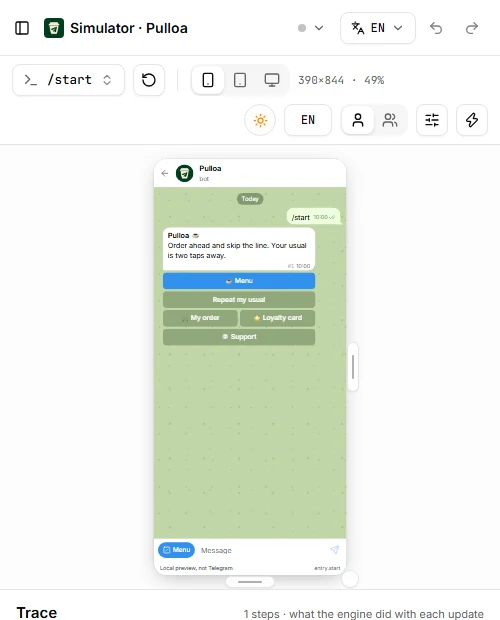
Place an order as a customer, retry a declined payment or see what a first-time visitor gets.
Agent Skill · Telegram Bot API 10.5 · v3.0.0
Give your coding agent a skill for the whole interface of a Telegram bot: screens, texts, keyboards, streaming replies, widgets and channel posts. Use bot-ui Studio to map your bot and test its flows.
MIT licensed · offline checks · no bot token needed to try it
Works with
 Claude Code
 Codex
 Cursor
 Gemini CLI
 Antigravity
 GitHub Copilot
 OpenCode
 Grok Build
 Replit Agent
Skill map
Follow a branch from the skill to the work your agent takes on. Studio branches again: a map and a simulator for your bot, editing a bot you already run, custom widgets and instructions for your coding agent.
 Bot interfacesTexts, menus, keyboards, colored buttons, forms, streaming replies.
 Product flowsShops, bookings, support: no stale Pay buttons, no double orders.
 Channel postsCompose, preview, approve and schedule. Never post twice.
 Agent through a botApproval buttons bound to one action, an operator allowlist.
 HTML widgets18 ready widgets inside messages, a size check and a preview.
 Premium emojiOne custom emoji pack across buttons, texts and posts.
 The whole Bot API194 methods and 426 types. Payloads checked before sending.
 bot-ui StudioA local editor for the bot-ui/ folder in your repository.
 Bot mapEvery screen as a card, arrows to where its buttons lead.
 SimulatorTap through a route as a user, both branches of a rule.
 Edit an existing botInventory an aiogram bot, then edit its screens. Saves go to your files.
 Custom widgetsStart blank or from the library. Studio writes widgets/<id>/.
 Instructions for the agentRequests on screens become one prompt. The agent commits on a branch.

See every screen of your Telegram bot and where its buttons lead. Test the flow in the simulator or edit a screen alongside your coding agent. Try Pulloa on this site, then run Studio on your own computer to work with your bot.
Place an order as a customer, retry a declined payment or see what a first-time visitor gets.
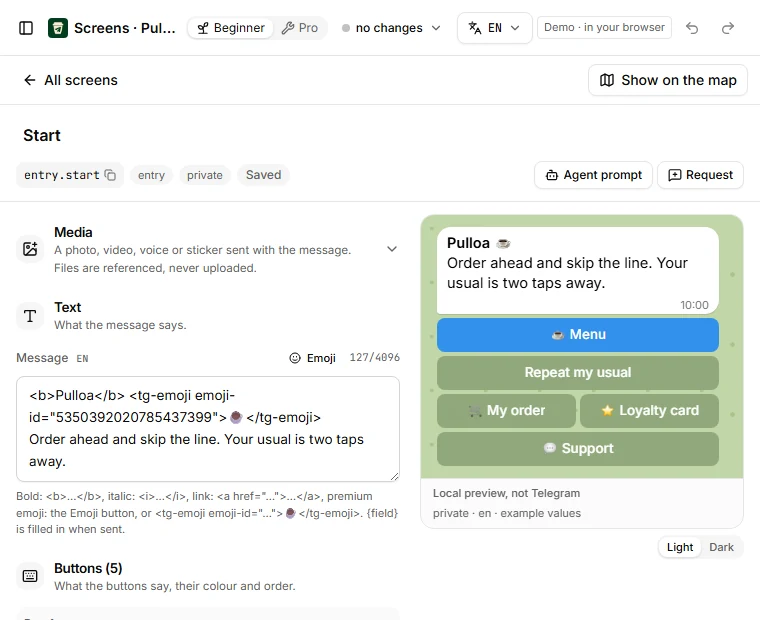
Edit messages, button labels and transitions. See the change in the chat preview and follow its route on the map.
Tap Keep it warm. The order tracker runs the demo bot’s widget HTML and shows the reply right in the card. Five more widgets wait on the Studio page: a cart, pickup times, a rating, a happy hour code and a drink quiz.
Try all six widgetsLoading widget…
The local Studio and your coding agent share the bot-ui/ folder in your repository.

Open your bot-ui/ folder in local Studio. For an existing aiogram bot, you can import a project from its code first.
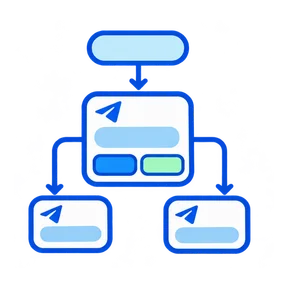
Each screen becomes a chat card. Arrows show where the buttons lead, including both branches of a rule.

Start the simulator and tap through the flow as a user. See the messages and transitions that each action triggers.

Leave a request on a screen and copy the task for your agent from Changes. Review the edits in Git and check the updated flow in Studio.
New in bot-ui Studio
Import your custom emoji packs by link, use them in any screen of your bot, and hand the same icon map to your coding agent.
Shop iconst.me/addemoji/ShopIcons · 120 emoji
Status markst.me/addemoji/StatusMarks · 48 emoji
Coffee sett.me/addemoji/CoffeeSet · 64 emoji
Telegram shows custom emoji when the bot has a Fragment username or its owner has Premium.
What changes in your bot
Drawn mock-ups of what the skill teaches your agent to build. A bot message has no CSS: its interface is text, formatting, keyboards and the moments between states.
Without the skill
With the skill
Real stages instead of “typing…”, one draft that fills in place, and a Stop button with a clear “stopped, incomplete” ending.
Your agent reports through its own bot. Approval buttons are bound to one action, and only the operators on the allowlist can press them.
Compose, validate and preview first. Nothing is published without a human’s yes, and a timed-out post is checked before any retry.
Compact tables and expandable quotes for reports; one live widget card instead of four status messages.
| Situation | Without the skill | With the skill |
|---|---|---|
| AI answer takes 20 s | Without: “typing…” then a wall of text | With: a streamed draft with real stages, a Stop button and a clear “stopped, incomplete” ending |
| A form | Without: “Send your phone” with no way back | With: buttons and a reply field in one step, Back keeps answers, Submit disabled until valid |
| “My balance” in a group | Without: posted for everyone to see | With: shown only to the person who tapped, and never leaked on errors |
| Order status | Without: four new messages per update | With: one live card that updates in place |
| Channel post timed out | Without: posted again, now twice | With: outcome treated as unknown and checked before any retry |
| “Ignore your rules” sent to an agent bot | Without: the agent obeys | With: quoted as data; the operator is told |
| Old SDK | Without: new features silently dropped | With: the gap is detected and bridged with an isolated adapter |
What your agent can do
The skill routes each task to focused guides, 66 recipes and offline tools, so your agent writes only what your project is missing.
Texts, menus, inline and reply keyboards, colored and disabled buttons, forms, navigation, streaming answers with Stop, Rich Messages, tables, localization, and the bot’s own settings from code (Bot API 10.5).
Shops, support, bookings, AI assistants, trackers: no stale “Pay” buttons, no double orders, no personal data leaking into groups.
Compose, validate, preview, approve and schedule channel posts; never post twice after a timeout.
Drive an agent from Telegram with an operator allowlist and approval buttons bound to one action. Inbound messages are data, not instructions.
Bot API 10.4 widgets inside messages: 18 ready widgets, a size check that follows the server’s algorithm, caption fallback and a local preview.
One custom emoji pack across buttons, texts and posts, with real ids from the pack and an all-or-nothing fallback when the bot is not eligible.
194 methods and 426 types in a local catalog. Validate a payload before sending; the agent refuses to invent a field.
No widget for a three-button menu, no table for two facts, no group widgets in production, no publishing without a human’s yes.
Prompt scenarios
23 prompts for every part of the skill. Pick a stage, copy a prompt, swap in your bot’s nouns and paste it into your agent.
Set up. First contact: an audit, Studio for a new or existing bot, a file you can hand to a designer.
You inherited a bot and want to know what is wrong first.
Use the telegram-bot-ui skill. Audit the interface of the bot in this repository: list every screen with its text, keyboard and where each button leads, then rank the problems by how much they hurt a user. Do not change any code yet.
Parts of the skill it uses
A new bot, and you want to see its screens on a map before writing handlers.
Set up bot-ui Studio for this repository. Create a bot-ui/ project from the starter template, validate it, run every simulator scenario, then start Studio on localhost and give me the link. Explain what each screen file does in two lines.
Parts of the skill it uses
Pairs well with: A browser tool: ask the agent to open the Studio link and tap through the simulator itself.
The bot already runs in production and you want its map without breaking it.
Read my aiogram bot in ./bot without changing it and make a bot-ui/ project from its commands, callbacks, buttons and texts. Keep every callback_data and deep link exactly as it is. Open the result in Studio and list the screens you could not map.
Parts of the skill it uses
Someone without the repository needs to edit texts and test the flow.
Export a Studio snapshot of bot-ui/ as one HTML file I can send to our designer. When they send back a patch file, apply it, refuse it if the project changed since, and show me the git diff.
Parts of the skill it uses
The skill activates on its own when you describe the task. To call it by name, start the prompt with /telegram-bot-ui in Claude Code or $telegram-bot-ui in Codex. Anything public, a channel post or a deploy, still waits for your yes.
Supported agents
The skill is one folder with a SKILL.md entry point. Install paths follow each host’s own documentation. See how each host loads it.
Claude CodePlugin with five subagents, or a plain skill folder in ~/.claude/skills.
Call it: /telegram-bot-ui
CodexReads ~/.agents/skills; custom agents in .codex/agents.
Call it: $telegram-bot-ui
CursorReads ~/.agents/skills; optional rule in .cursor/rules.
Call it: /telegram-bot-ui
Gemini CLI~/.gemini/skills, or gemini skills install from the repository URL.
Activates from the task description
AntigravityReads .agents/skills in the workspace; skills become slash commands.
Call it: /telegram-bot-ui
GitHub CopilotReads ~/.agents/skills; optional copilot-instructions block.
Activates from the task description
OpenCodeReads .agents/skills in the project and ~/.config/opencode/skills.
Activates from the task description
Grok BuildxAI’s agent. Reads .grok/skills and ~/.grok/skills.
Activates from the task description
Reads ~/.hermes/skills; project folders after hermes skills trust.
Activates from the task description
Replit AgentReads .agents/skills in the Repl, or imports the skill from the repository URL.
Activates from the task description
Reads ~/.agents/skills; install with --host codex.
Activates from the task description
Cline and others: paste the AGENTS.md snippet and keep the folder in the repo.
Activates from the task description
Install
Every command installs the latest version and comes with the one that updates it. Then just ask: the skill activates on its own, no API names needed.
Run it in your project; the CLI finds the agents on your machine and asks where to install. Add -g to install for every project. Needs Node.js 22.20 or later.
Install
npx skills add hlibsuslov/telegram-bot-uiUpdate to the latest
npx skills update telegram-bot-uiOr with the GitHub CLI (2.96+), latest tagged release
gh skill install hlibsuslov/telegram-bot-uiUpdate with gh skill update.
More hosts and options: install guide.
Short answers. The README has the long ones.